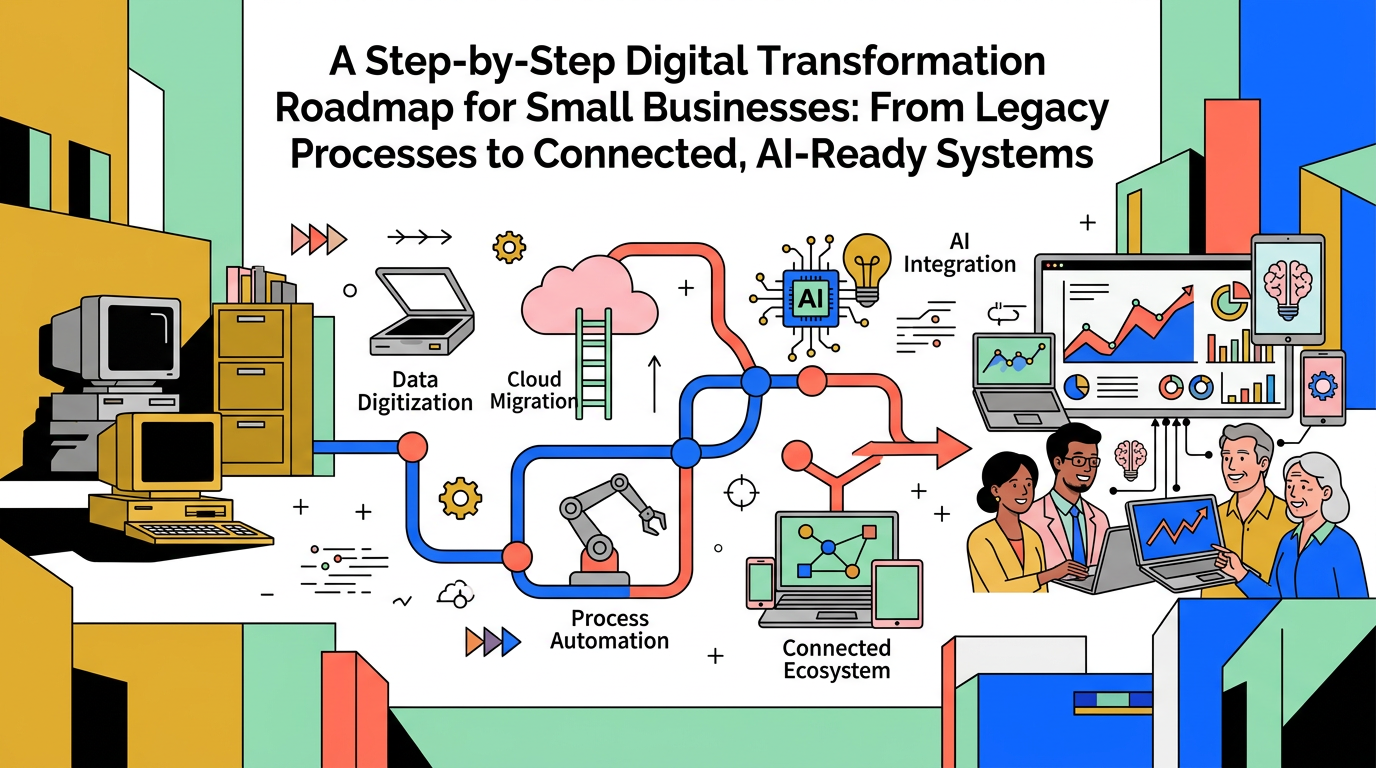
A Step‑by‑Step Digital Transformation Roadmap for Small Businesses
From Legacy Processes to Connected, AI‑Ready Systems
Maira Koin
CEO, F Koin Tech
Published
18 July, 2026
Many small businesses know they need to modernize their operations, but the idea of full Digital Transformation can feel vague and overwhelming. You may still rely on spreadsheets, paper forms, email threads, and disconnected systems, yet you keep hearing about Artificial Intelligence, cloud computing, and smart Business Automation.
The real question is simple: how do you get from where you are today, with legacy processes and manual work, to a connected, data‑driven, AI‑ready business without breaking day‑to‑day operations?
This guide lays out a clear, business‑friendly digital transformation roadmap for small and medium businesses. It focuses on practical steps, not buzzwords, and shows how software solutions, workflow automation, and modern cloud solutions can improve efficiency, reduce costs, and prepare you for the next wave of business technology and AI for Business.
Why digital transformation matters for small businesses now
Digital transformation is not about buying the latest tools. It is about using technology to redesign how your business works so you can compete and grow in a world where customers expect speed, transparency, and personalization.
For small businesses, this usually means:
- Replacing manual, paper‑based, or spreadsheet‑driven processes with connected systems
- Using Business Automation to remove repetitive work
- Capturing better data so you can make decisions with Data Analytics, not guesswork
- Laying a foundation so AI Automation can assist your team in the future
Done well, digital transformation directly improves business productivity, customer experience, and business efficiency. It also makes it much easier to introduce AI for Business later, because your data and workflows are already structured.
From legacy to AI‑ready: a simple 5‑stage roadmap
Instead of trying to “go digital” all at once, it helps to think in stages. The roadmap below works for many small and medium businesses, regardless of industry.
- Assess your current state and identify bottlenecks
- Standardize and digitize your key processes
- Connect systems and introduce workflow automation
- Use data and dashboards for smarter decisions
- Add targeted AI and advanced capabilities
Each stage builds on the previous one, so you can move at a realistic pace and see benefits at every step.
Stage 1: Assess your current systems and pain points
Every successful Digital Strategy starts with a clear picture of where you are today. This is especially important for businesses with legacy processes, older enterprise software, or a mix of disconnected tools.
Map your core business processes
Gather leaders or key staff and map the main processes that keep the business running. For most companies, these include:
- Lead generation and sales
- Customer onboarding and service delivery
- Operations and fulfillment
- Invoicing, payments, and financial reporting
- Customer support and account management
For each process, sketch the real steps on a single page. Include who does what, which tools are used, and where data is stored.
Identify legacy tools and manual work
Next, highlight where you depend on:
- Spreadsheets that act as core systems
- Paper forms or manual signatures
- Shared inboxes and long email threads
- Old desktop software with no integration options
- Individual staff “workarounds” that only they understand
These are usually your biggest obstacles to Business Process Optimization and future AI Automation.
Define business outcomes before tools
Before you think about software development, web development, or new SaaS solutions, define what you want to improve. For example:
- Reduce order processing time from 5 days to 2 days
- Respond to new leads within 1 business hour
- Cut manual reporting time by 50 percent
- Increase repeat purchases by 20 percent
These goals will shape your roadmap and help you measure success.
Stage 2: Standardize and digitize your processes
Trying to automate or add Artificial Intelligence to messy, inconsistent processes usually fails. The next step is to simplify and standardize how work should happen, then move it into modern, digital tools.
Document “one best way” for key workflows
For each core process, define a simple, repeatable sequence of steps. Keep it practical rather than perfect. Examples:
- Standard sales stages from initial inquiry to closed deal
- Clear onboarding checklists for new customers
- Defined approval flows for quotes, discounts, or projects
This shared playbook makes it much easier to introduce workflow automation and enterprise software later.
Replace paper and spreadsheets with digital tools
Start by moving the most fragile or time‑consuming manual processes into simple, user‑friendly tools. For example:
- Online forms instead of paper forms
- A basic CRM instead of scattered contact spreadsheets
- Cloud accounting instead of desktop files passed around
- Shared task boards instead of email chains
You do not need advanced custom software development for every need. Off‑the‑shelf software solutions or lightweight web apps often work well at this stage.
Plan where custom software makes sense
There are situations where tailored Custom Software Development or a dedicated mobile app development project can be a better fit, for example:
- Unique workflows that define your competitive edge
- Complex pricing, scheduling, or configuration rules
- Heavy use of field staff who need a dedicated mobile experience
- Legacy systems that cannot integrate with modern tools
In those cases, Technology Consulting can help you decide whether to build new enterprise software or extend your current stack.
Stage 3: Connect systems and introduce workflow automation
Once your key processes are standardized and digitized, the next step is to connect systems and remove manual hand‑offs. This is where Business Automation starts to drive noticeable gains in productivity.
Eliminate double entry and data silos
Disconnected tools create errors and waste time. Look for opportunities to connect:
- Website or e-commerce solutions with CRM and invoicing
- CRM with email marketing and support tools
- Project or job management with time tracking and invoicing
- Operational systems with your financial dashboards
Where possible, choose cloud solutions that integrate cleanly so data flows automatically.
Automate routine, rule‑based workflows
Start with small, clear automations that free up staff time without changing your business model. For example:
- When a website form is submitted, create a lead record, send a confirmation email, and alert the sales team
- When a quote is approved, create a project, tasks, and an initial invoice
- When a payment is received, mark the invoice as paid and send a receipt
- When a support ticket is created, assign it based on topic or customer value
These workflows are often supported by modern SaaS solutions, web development enhancements, or focused software development around your existing tools.
Design with the customer experience in mind
Automation is not just about saving internal time. It should also make life easier for your customers. Good examples include:
- Order and delivery notifications that keep customers informed
- Self‑service portals to view orders, invoices, or project status
- Online booking or scheduling instead of back‑and‑forth emails
Thoughtful Business Innovation at this stage often leads directly to higher satisfaction and loyalty.
Stage 4: Build a data foundation and use analytics
Once your systems are connected, you will begin to generate more reliable data. The next step is to turn that data into useful insight with simple Data Analytics and reporting.
Decide on a single source of truth
Choose where your most important data will live. For example:
- Customer and sales data in your CRM
- Financial data in your accounting or ERP system
- Usage or operational data in a central reporting database
Other systems should feed into this core, not create competing versions of the truth.
Define key metrics for each business area
Focus on a small set of metrics that truly matter. Typical examples include:
- New leads, conversion rates, and average deal size
- Order cycle time, on‑time delivery, and rework rates
- Invoice aging, cash collection time, and recurring revenue
- Support response times and customer satisfaction scores
Simple dashboards that track these indicators help leaders spot issues quickly and guide Digital Innovation efforts.
Use analytics to refine your processes
With better data, you can:
- Identify bottlenecks where work regularly gets stuck
- See which products, services, or segments are most profitable
- Understand which channels drive the best long‑term customers
- Test changes to workflows and measure the real impact
This data‑driven approach is a key stepping stone to more advanced AI for Business initiatives.
Stage 5: Add targeted AI and advanced capabilities
Only after your processes are digitized, connected, and measured does it make sense to add more advanced Artificial Intelligence and predictive features. At this stage, you are not experimenting blindly. You are adding intelligence to a foundation that already works.
Where AI can help small businesses first
Most small and medium companies see early value from AI in a few practical areas:
- Customer communication: Drafting emails, summarizing tickets, and suggesting responses for support teams
- Sales prioritization: Scoring leads based on behavior and fit so teams focus on the right opportunities
- Document processing: Extracting data from invoices, forms, and contracts into your systems
- Reporting and insight: Highlighting patterns or anomalies in dashboards for leadership
These uses of AI Automation enhance existing workflows rather than replacing human judgment.
Examples of AI‑ready use cases
Once your digital foundation is in place, it becomes realistic to explore:
- AI assistants embedded in your website or e-commerce solutions to guide visitors
- Intelligent search in your knowledge base or internal document systems
- Predictive maintenance or forecasting for equipment‑heavy operations
- Personalized recommendations in membership portals or SaaS solutions
All of these rely on clean data and clear processes, which is why the earlier stages of the roadmap matter so much.
Sample roadmap: 12–24 month digital transformation journey
Every business is different, but the timeline below shows how many small companies phase their transformation to avoid disruption.
Phase 1 (Months 1–3): Discover and design
- Map core processes and document the current state
- Identify key pain points and business goals
- Audit existing tools and small business technology
- Define a high‑level Digital Strategy and priorities
Phase 2 (Months 3–9): Digitize and standardize
- Introduce or upgrade core systems (CRM, accounting, project tools)
- Move paper or email‑driven workflows into digital forms and task systems
- Implement essential web development changes, such as improved lead forms and portals
- Train staff and refine documented processes
Phase 3 (Months 9–18): Integrate and automate
- Connect key systems using cloud computing and integrations
- Automate high‑volume, rule‑based workflows across departments
- Introduce basic dashboards with agreed metrics
- Address gaps with Custom Software Development where needed
Phase 4 (Months 18–24): Optimize and add AI
- Review data from dashboards and optimize bottlenecks
- Pilot 1 or 2 AI for Business use cases in low‑risk areas
- Embed learnings into new versions of processes and tools
- Plan the next cycle of digital transformation and business innovation
Common digital transformation mistakes to avoid
Many small businesses run into similar issues when modernizing their systems. Knowing these in advance can save time and money.
Mistake 1: Starting with tools instead of strategy
Buying new platforms without a clear roadmap often leads to overlapping subscriptions and frustrated staff.
Better approach: Start with business outcomes and process maps, then select technology that directly supports those goals. Use Technology Consulting if you need help translating business needs into system requirements.
Mistake 2: Trying to change everything at once
Big‑bang transformation projects can overwhelm your team and disrupt operations.
Better approach: Break the roadmap into small, manageable releases. Each step should deliver specific value, such as faster lead response, smoother onboarding, or quicker reporting.
Mistake 3: Ignoring the people side of change
Even the best software solutions fail if staff do not understand or trust them.
Better approach: Involve team members early, communicate why changes are happening, and provide training and support. Ask for feedback to refine processes and interfaces.
Mistake 4: Underestimating data quality
Bad data creates bad insight. If your records are incomplete or inconsistent, analytics and AI will struggle.
Better approach: Define simple data standards, regularly clean your main systems, and make someone responsible for data quality in each area. This is critical for future AI Automation and Future Technology Trends.
Mistake 5: Treating digital transformation as a one‑off project
Customer expectations and technology move quickly. A one‑time upgrade will not keep you competitive for long.
Better approach: View digital transformation as an ongoing practice. Schedule regular reviews of systems, processes, and metrics, and adjust your roadmap as the business evolves.
Practical selection criteria for your digital tools
Choosing the right mix of tools is one of the most important decisions in your roadmap. Use these criteria to guide discussions with vendors or partners.
1. Business fit and usability
- Does the tool match how your teams actually work?
- Is the interface simple enough for non‑technical staff?
- Can you start small and grow into more features over time?
2. Integration and cloud readiness
- Is the solution cloud‑based so your team can work from anywhere?
- Does it integrate with your existing or planned core systems?
- Can it fit into a connected ecosystem of SaaS solutions and cloud solutions?
3. Automation and AI potential
- Does the tool support triggers, workflows, and basic automation?
- Are there built‑in AI features that can help your team over time?
- Can data from this system be used later for more advanced AI for Business use cases?
4. Total cost and long‑term flexibility
- What are the licensing and implementation costs today and at your next growth stage?
- Will you be locked into one provider in a way that limits future choices?
- Is there a clear roadmap for features and support?
How digital transformation supports startup growth and established SMBs
This roadmap applies whether you are a young startup or a more established company with years of legacy processes.
- For startups: A modern, integrated stack supports fast iteration and scalable Startup Growth without adding headcount every time you win more customers.
- For established businesses: Modernization unlocks capacity, removes key‑person risk, and prepares you for new digital revenue streams like subscriptions, self‑service portals, or new SaaS solutions.
In both cases, a step‑by‑step approach reduces risk and spreads investment over time.
Looking ahead: future technology trends to watch
While your immediate focus should be on practical steps, it helps to understand the direction of business technology and how today’s decisions impact your options later.
More AI inside everyday business tools
AI capabilities are being built into email, CRM, accounting, and collaboration platforms. Choosing modern, cloud‑based systems now means you will be able to activate these features with less effort in the future.
No‑code and low‑code for faster innovation
No‑code and low‑code platforms let business users configure simple apps and workflows without full programming. Paired with solid Technology Consulting and occasional software development, they can speed up Digital Innovation and experimentation.
Deeper integration across cloud ecosystems
Cloud vendors are investing heavily in seamless integration. Over the next few years, it will become easier to connect web development, mobile app development, and e-commerce solutions into one coherent digital platform.
Greater focus on trust, security, and compliance
As more processes and data move into the cloud, customers and regulators will pay closer attention to privacy and security. Building your stack around reputable cloud computing providers and good governance practices will help you stay ahead.
Summary: building an AI‑ready, connected business step by step
Moving from legacy, manual processes to connected, AI‑ready systems does not require a single, risky transformation project. It requires a thoughtful roadmap that combines clear business goals, modern software solutions, and gradual Business Automation.
By following the stages in this guide, your business can:
- Replace fragile, spreadsheet‑driven processes with reliable digital workflows
- Connect systems so data flows automatically instead of through copy‑and‑paste
- Automate routine work and free your team for higher‑value tasks
- Use Data Analytics to guide decisions about products, pricing, and operations
- Introduce Artificial Intelligence gradually where it clearly supports value
You do not need to do everything at once. Start with your most important processes, deliver quick wins, and build momentum. Over time, this roadmap turns technology from a cost and a headache into a core driver of growth, resilience, and customer satisfaction.
If you would like support with planning or executing your digital transformation, including Custom Software Development, web development, mobile app development, AI Automation, or integrated e-commerce solutions, consider speaking with an experienced technology partner. A short conversation can help you prioritize initiatives, avoid common pitfalls, and design a practical, staged roadmap for your next 12 to 24 months of digital growth.