A CTO-Level Guide to Evaluating Enterprise Software Vendors for AI and Workflow Automation Initiatives
A practical CTO-style framework to evaluate enterprise software vendors for AI and workflow automation initiatives, reduce risk, and protect long-term value.
Maira Koin
CEO, F Koin Tech
Published
14 August, 2026
Choosing the right enterprise software vendor for Artificial Intelligence and Workflow Automation is now a board-level decision. Get it wrong and you do not just waste budget, you hard-bake complexity into your operations, slow Digital Transformation, and make every future change more painful than it needs to be.
This guide gives you a CTO-level evaluation framework in plain business language. It focuses on AI for Business, Business Automation, and Digital Innovation, and is designed for leaders who must pick between competing Software Solutions, SaaS Solutions, and Custom Software Development partners for critical initiatives.
Why vendor selection for AI and automation is different
Traditional Enterprise Software decisions often focused on features, price, and basic integration. AI Automation and Workflow Automation introduce new dimensions of risk and opportunity that most RFP templates still barely touch.
Three shifts matter most for decision makers:
- AI changes your operating model. You are not just buying tools, you are changing how decisions are made, how work is allocated, and how customers experience your brand.
- Data becomes a strategic asset. Vendors will touch, store, and process data that feeds your future AI for Business, Data Analytics, and Digital Strategy. The wrong contract can quietly give away that advantage.
- Change never really ends. AI and automation are not one-off projects. They are capabilities that need to evolve with Business Technology, regulations, and Future Technology Trends.
That is why you need a vendor evaluation approach that goes deeper than feature checklists and reference calls.
Step 1: Start from business outcomes, not technology features
Before you invite any vendor to a demo, distill the problem in business terms. Clear outcomes help you separate serious partners from polished sales pitches.
Define a small set of hard outcomes
Good examples for AI and automation initiatives include:
- Reduce manual handling of a specific workflow, for example claims, onboarding, or order exceptions, by a defined percentage.
- Cut customer response time in one channel from hours to minutes without hurting Customer Experience metrics.
- Increase Business Productivity in a back-office team by freeing a fixed number of hours per month for higher value work.
- Improve Data Analytics for a function so that leaders can see daily operational metrics from a single view.
Keep these outcomes tightly scoped. You can always expand later once the first wave is successful.
Translate outcomes into vendor-neutral requirements
Turn each outcome into simple, testable requirements, for example:
- “The workflow engine must support X daily transactions with Y approvers and Z exception types.”
- “The AI assistant must keep satisfaction scores above our current human-only baseline over a three-month pilot.”
- “The solution must write data back to our CRM and ticketing tools so they remain the systems of record.”
These statements feed directly into vendor questions, proof-of-concept designs, and success metrics. They also expose vendors who talk broadly about Artificial Intelligence but cannot connect to clear business value.
Step 2: Decide your strategic posture, build versus buy versus blend
Before you compare vendors, make a conscious choice about where you want long-term control. This is a leadership decision, not something to push fully to IT.
Three typical postures for AI and automation
- Buy first, configure deeply
Use mature SaaS Solutions or Enterprise Software as your main platform, then extend with configuration and light integration. This fits organisations that care most about speed, standardisation, and vendor-provided updates. - Blend platforms with targeted Custom Software Development
Treat strong SaaS tools as building blocks, then invest in custom orchestration, portals, or AI components where differentiation matters. This is common for companies that need a unique Customer Experience or complex workflow while still using off-the-shelf building blocks. - Build strategically around core IP
Commission Custom Software Development for critical workflows, data models, and AI logic, and use SaaS for non-differentiating functions like HR, accounting, or generic collaboration. This is closer to a product mindset and suits businesses with proprietary processes.
Your posture should reflect how much your process and data contribute to competitive advantage. For example, a bank’s credit decisioning logic is usually strategic, while its email marketing platform is not.
Step 3: Build a concise vendor evaluation scorecard
A structured scorecard keeps discussions focused and helps you defend decisions to boards, auditors, or regulators. It also makes it easier to compare Software Solutions that present themselves in very different ways.
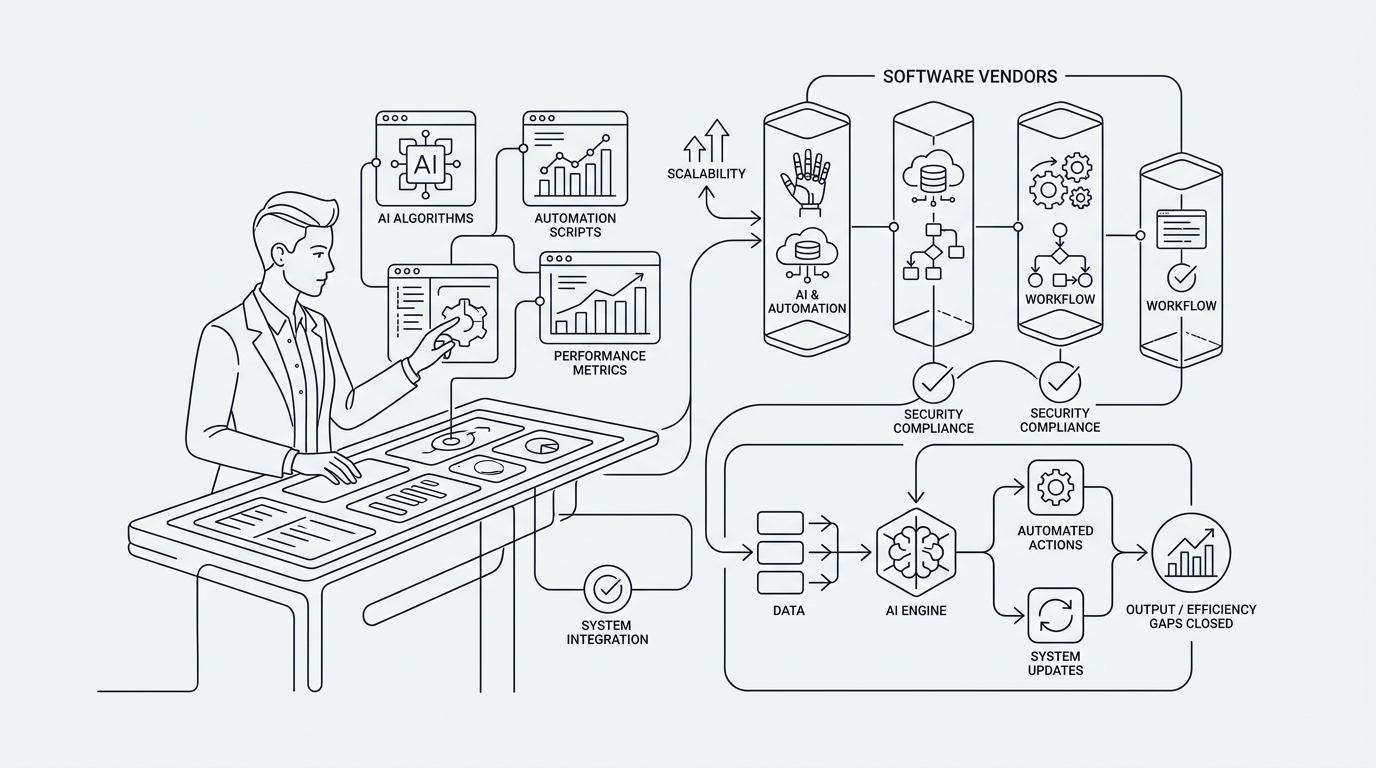
Core evaluation dimensions for AI and workflow automation vendors
Most enterprise buyers benefit from scoring vendors from 1 to 5 on at least these dimensions:
- Business fit: Alignment with your use case, industry, and operating model.
- AI and automation capability: Practical maturity of AI Automation, rules engines, and Workflow Automation features for your scenarios.
- Integration & data strategy: How the solution fits into your existing Business Technology and future Data Analytics plans.
- Security, compliance, and risk: How they protect data and support your obligations.
- Scalability and performance: Capacity to support current and near-future volumes and user counts.
- Vendor stability and roadmap: Financial health, product direction, and how they manage Technology Trends.
- Total cost and commercial model: Licensing, Cloud Computing costs, implementation, and ongoing change costs.
- Change enablement and support: How they help your people adapt, including training and ongoing Technology Consulting.
You can weight each dimension differently depending on your priorities. For example, a regulated organisation might weight security higher than feature breadth.
Step 4: Probe business fit and use case alignment
Many AI and automation tools look flexible on paper. The real test is how directly they support your specific use cases without contorting your processes into something unrecognisable.
Questions to ask about business fit
- Which clients of a similar size and complexity use your platform for related workflows, for example claims, underwriting, onboarding, field service, or logistics?
- Can you show live examples of configurations close to our needs, not just generic demos?
- What process changes did your most successful customers make to get value quickly?
- Where is your solution a poor fit? Which use cases usually fail or require heavy workarounds?
Push vendors to talk about failed projects as well as successes. Mature partners can articulate where they are not a good choice, which is often a positive signal.
Step 5: Assess real AI for Business capability, not just marketing
Artificial Intelligence is now printed across pitch decks and websites. As a buyer, your job is to separate buzzword-heavy tooling from vendors who treat AI as a disciplined capability.
Dimensions of AI maturity to evaluate
- Supported AI use cases
Clarify which concrete problems their AI handles, for example document classification, routing, knowledge search, summarisation, forecasting, recommendation, anomaly detection. - Data requirements and constraints
Ask what data their AI needs to work well, how much history, which fields, and what quality thresholds. Vendors that cannot answer concretely probably have not seen enough production use. - Control and transparency
Understand how you can override or constrain AI behaviour. For example, can you require human approval for certain decisions, or restrict AI to suggested-only mode? - Monitoring and governance
Ask how they help you track model performance, bias, drift, and incidents. Is there clear auditability of AI-driven decisions that affect customers or regulators?
You do not need a PhD-level discussion. You do need enough clarity to know where AI automation can safely operate and where it should remain an assistant to humans.
Step 6: Evaluate workflow and automation depth
Many tools offer basic Workflow Automation, for example simple triggers and notifications. Enterprise-grade automation for Business Process Optimization usually requires more depth.
Key workflow capabilities to examine
- Process modelling: Can you represent your real approval paths, exception handling, and parallel tasks, or only basic linear sequences?
- Rules vs AI-based routing: How does the platform mix explicit rules with AI-driven suggestions, and can you tune this without rewriting core software?
- Human in the loop: Can you clearly define when humans review, override, or add context, especially for sensitive steps?
- Versioning and change management: How easy is it to change workflows, test them, and roll back if something goes wrong?
During demos, avoid “happy path only” presentations. Ask vendors to show how their system behaves when data is missing, approvals are delayed, or customers do something unexpected.
Step 7: Inspect integration and data strategy in detail
AI and automation initiatives succeed or fail on data flow. A solution that cannot talk properly to your core systems will create new silos, not Business Efficiency.
Questions to uncover integration realities
- What are the primary ways your solution exchanges data with other systems, for example event streams, file-based sync, or integration platforms?
- Which common SaaS Solutions and Enterprise Software platforms do you already integrate with for clients like us?
- How do you handle master data, such as customers, accounts, products, across multiple tools so there is one source of truth?
- What happens if an integration fails mid-process? How are partial updates detected and resolved?
If your organisation already uses a central analytics or data platform, involve that team early. They can evaluate how well the vendor fits into your broader Data Analytics and Cloud Solutions strategy.
Step 8: Look beyond security checklists to real risk posture
Security questionnaires and certifications are necessary but not sufficient, especially where AI uses sensitive operational or customer data.
Risk and compliance topics to cover
- Data residency and access: Where will data be stored, who can access it, how is access reviewed, and what logs exist?
- AI training practices: Is your data used to train shared models that benefit other clients, or is training isolated per tenant or per customer?
- Incident response: How have they handled previous security incidents or outages? Ask for real examples if possible.
- Regulatory alignment: For your jurisdiction, can they clearly explain how they support privacy and sector-specific rules?
You are not aiming to eliminate risk, that is impossible. You are aiming for a vendor whose controls, transparency, and attitude are compatible with your own risk appetite.
Step 9: Understand vendor roadmap and ability to track Technology Trends
AI and automation markets move quickly. The vendor you choose should be able to keep pace with Future Technology Trends without constantly breaking your implementation.
Signals of a credible roadmap
- They can articulate a clear 12 to 24 month direction for their AI for Business and automation features, not just vague statements.
- They have a public track record of shipping improvements on a predictable cadence.
- Client advisory boards or councils exist, and their feedback is visible in the roadmap.
- There is a clear pattern for deprecating old features in a controlled way, with realistic notice periods.
Ask how often they have replatformed or changed architecture in ways that required major client rework. Occasional change is fine; repeated upheaval is not.
Step 10: Model total cost, including change and growth
Initial license price is often the least interesting number in AI and automation initiatives. Total cost over three to five years is what matters.
Cost dimensions you should model
- Licensing and consumption: Seats, volume-based pricing, AI inference costs, and any fees for premium features.
- Implementation and Custom Software Development: Internal effort and external partners for initial setup, integrations, and change management.
- Ongoing configuration and optimisation: Time required to adjust workflows, rules, reports, and AI models as your business evolves.
- Exit and migration costs: Level of effort to extract data and process logic if you change direction in the future.
Ask vendors to provide pricing scenarios based on your growth plans, not only your current footprint. This is especially important for high-volume E-commerce Solutions, contact centers, or any workflow that might scale quickly.
Step 11: Test with a structured pilot, not a proof-of-concept theater
A pilot or proof of concept is your chance to validate claims before a large commitment. Treat it like a serious experiment, not a demo extended by a few weeks.
Designing a useful AI and automation pilot
- Pick one or two specific workflows with clear boundaries and measurable outcomes.
- Agree success metrics in advance, for example reduction in handling time, change in satisfaction scores, error rate, or throughput.
- Include a realistic set of edge cases, not just ideal transactions.
- Involve real end users, not only project staff, so you see adoption and usability issues.
Keep the pilot short and intense, often 8 to 12 weeks is enough. The aim is to build confidence, surface hidden risks, and understand how the vendor collaborates when things are messy.
Step 12: Assess change management, not only technology
AI for Business and Workflow Automation initiatives change roles, incentives, and sometimes entire operating models. Vendors that ignore this dimension leave you with shelfware and cynical teams.
Questions about change and adoption
- What training materials and programmes do you provide for non-technical staff?
- How have other clients redesigned roles or KPIs after automation, and what worked best?
- Do you offer change management support directly, or via partners, and what does that look like in practice?
- How do you help clients avoid “shadow automations” or conflicting workflows created by different teams?
Strong partners treat change management as a core part of their offer, not an optional add-on.
Red flags to watch for in vendor evaluations
Many deals that later struggle show warning signs early. Some are technical, others cultural.
Common red flags
- All benefits are presented in vague terms like transformation or innovation, with no concrete metrics.
- Sales insists your requirements are trivial, but cannot or will not demonstrate them end-to-end.
- Contracts that grant the vendor broad rights to use your data in ways that are hard to unwind later.
- Support or customer success teams have very high turnover, or you cannot meet them during evaluation.
- References are limited to small pilots or early adopters rather than stable, scaled use cases.
None of these automatically disqualify a vendor, but each one should trigger deeper questions.
How this evaluation approach applies across different business contexts
The same core framework works for different types of organisations, but the emphasis changes slightly.
For mid-market companies modernising operations
Focus your scoring on:
- Strength of Workflow Automation for your specific back-office processes.
- Fit with your existing Small Business Technology stack, including CRM, finance, and collaboration tools.
- Change enablement, since staff may never have worked with automation or AI assistants before.
For scale-ups pursuing Startup Growth
Emphasise:
- Vendor roadmap, adaptability, and pricing at higher volumes.
- Ease of integrating with your current Web Development, Mobile App Development, and Cloud Solutions.
- How the platform supports experimentation, such as A/B testing new workflows or AI behaviours.
For larger enterprises rationalising fragmented tools
Prioritise:
- Ability to become a central orchestration layer across many Software Solutions and Enterprise Software systems.
- Support for complex governance, multiple business units, and formal risk functions.
- Evidence of multi-region, high-volume deployments with real Service Level Agreements.
Future Technology Trends to factor into vendor choice
Your AI and automation platform should not only meet today’s needs, it should keep options open for the next few years.
Trends worth watching as you evaluate vendors
- Domain-specific AI models: Vendors are starting to offer models tuned for legal, healthcare, finance, and other verticals. Ask how easily you can adopt such improvements without major rebuilds.
- Process mining and discovery: More tools now combine automation with analytics that map how work actually flows. This can materially improve Business Process Optimization if it plugs cleanly into your stack.
- AI in customer-facing channels: From support to sales to E-commerce Solutions, AI will increasingly sit in front of customers. Make sure vendors can respect your brand tone, service promises, and regulatory guardrails.
- Convergence of analytics and automation: Data Analytics platforms are adding automation features, and automation tools are adding analytics. Your vendor should have a coherent position on this convergence, not a patchwork of bolt-ons.
These trends will influence how you design customer journeys, how you plan capacity, and how you handle marketing and SEO. For example, if your automation project touches digital self-service channels, it may need to coordinate closely with your search strategy work, supported by resources such as What is SEO? How it can help to grow?.
Working with a technology partner during vendor selection
For many organisations, it is helpful to work with a Technology Consulting partner who sits between you and vendors. The right partner brings pattern recognition from previous automation, Web Development, and Cloud Computing projects, which can significantly shorten your evaluation cycle.
Where an external partner can add value
- Translating business outcomes into technical and functional requirements that vendors can respond to clearly.
- Stress testing vendor claims during demos and pilots, including data, integration, and workflow complexity.
- Comparing commercial models and long-term cost scenarios across different Software Solutions.
- Designing a pragmatic roadmap that blends SaaS Solutions, Custom Software Development, and existing Business Technology into a coherent whole.
You remain the expert on your market, customers, and risk appetite. A partner brings experience across multiple industries and helps you avoid repeating common mistakes.
Summary: a CTO-level vendor checklist you can act on
Evaluating enterprise software vendors for AI and Workflow Automation is no longer just an IT procurement task. It is a strategic decision that shapes Business Productivity, Customer Experience, and Business Innovation for years.
Use this kind of framework to keep your evaluation grounded:
- Start from a handful of clear, measurable business outcomes.
- Decide where you want control through Custom Software Development and where standard SaaS Solutions are fine.
- Assess AI for Business capability, workflow depth, integration fit, and risk posture using consistent criteria.
- Model total cost over several years, including change and possible exit.
- Validate claims with a structured pilot that exercises real edge cases.
Handled this way, vendor selection becomes less about chasing the latest buzzwords and more about building an AI and automation foundation that can grow with your company.
If you are planning an AI Automation or Business Process Optimization initiative and want an independent view on vendor options, it is worth having a focused conversation with an experienced technology partner. Reviewing your goals, constraints, and current Business Technology landscape together can reveal a practical shortlist of vendors and a realistic implementation plan that supports Digital Transformation without adding unnecessary risk.